
The workflow for my self-hosted static website is created roughly around two loops, one for the creation of content and the other for deploying the content on my remote vps. Central connecting component in this workflow is the git-repository.
Basic principles
- On-trick pony
- KISS
- Loosely coupled
- Secure
- Autonomous
- Easy to maintain
- Robust
Following these basic priciples I ended up with the following:
- Webserver, running on my hosted virtual private server (VPS).
- Static website, run by Zola.
- One git repository, one single source of truth.
- Git only used as repository, no git-pipeline.
- Build-phase runs on web server, build runs local on VPS.
- Two independant loosely coupled loops, creation and publishing.
- Push-pull mechanism, creation loop "pushes" and the publishing loop "pulls".
Creation loop
The creation loops starts with me writing content and running zola serve in the background. On each save, zola detects the changes and rebuilds the site.
Revieuwing and editing the content is a sub-loop within the creation loop.
Once I'm satified the content is commited and pushed to the git repository.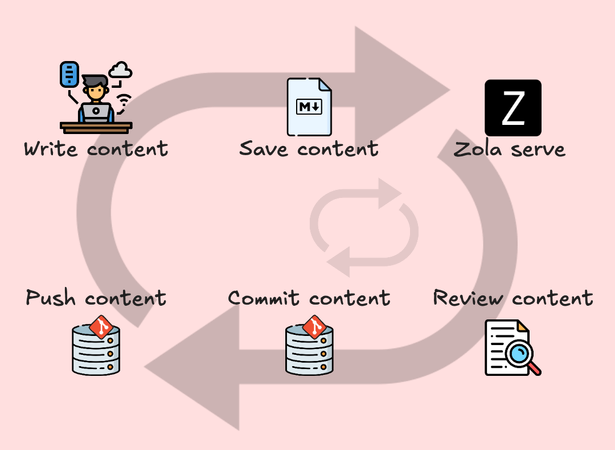
If we follow the analogy of a bike, it's me pushing the pedals.
Publishing loop
The publishing loop runs on the VPS under the www-user account, an account with very limited rights on the server.
The engine behind the publishing loop is a cron-job running a bash/shell script. The script checks for changes.
When a change is detected the script pulls the content from the repository and builds the website.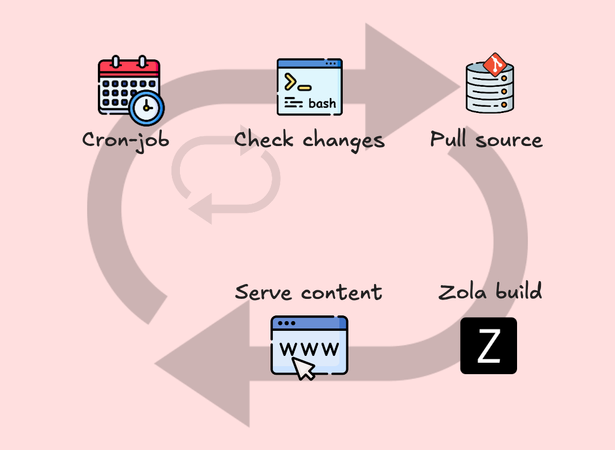
Crontab
A cron-job runs on regular intervals. At 10, 30 and 50 minutes past every hour and every day between 9 am and 2 am. It then runs the script zola-deploy.sh.
Crontab.guru, a cron schedule expression generator was used to figure out the schedule.
Crontab commands:
- crontab -e, create or edit a cron job.
- crontab -l, list current cron jobs.
# Edit this file to introduce tasks to be run by cron.
#
# Each task to run has to be defined through a single line
# indicating with different fields when the task will be run
# and what command to run for the task
#
# To define the time you can provide concrete values for
# minute (m), hour (h), day of month (dom), month (mon),
# and day of week (dow) or use '*' in these fields (for 'any').
#
# Notice that tasks will be started based on the cron's system
# daemon's notion of time and timezones.
#
# Output of the crontab jobs (including errors) is sent through
# email to the user the crontab file belongs to (unless redirected).
#
# For example, you can run a backup of all your user accounts
# at 5 a.m every week with:
# 0 5 * * 1 tar -zcf /var/backups/home.tgz /home/
#
# For more information see the manual pages of crontab(5) and cron(8)
#
MAILTO=""
# m      h      dom mon dow   command
10,30,50 9-23,0-1 * * * cd /home/www-user/www-content && /bin/bash zola-deploy.sh
The line MAILTO="" prevents emails send to the local user. Logging is generated by the script, email that is never read should not be generated. In case you need to debug the workflow you can remove the line.
Calling bash-scripts
Crontab is not a shell environment like /bin/bash. Some things work differently than a regular bash-script.
Three ways that actually work:
- Jump into the directory and use
/bin/bash,
cd /script/dir/ && /bin/bash script.sh,- Jump into the directory and use the
./notation,
cd /script/dir/ && ./script.sh- or use the full path to the script:
/script/dir/script.shDo NOT use source script.sh. This will fail.
Shell script
The shell script uses git rev-parse HEAD before and after a git pull --ff-only to determine any changes. In case the "HEAD" number has changed the zola site is "build" with the destination /var/www/taotek.nl.
#! /bin/bash
# file: /home/www-user/www-content/zola-deploy.sh
# For every git repository in the dirs list
# do a "git pull --ff-only",
# update if "HEAD" has changed and
# when changed build the "zola"-site

touch update.log

# Comma separated list of directories
dirs=("taotek.nl")

for dir in "${dirs[@]}"; do
    if [ -d "$dir/.git" ]
    then
        cd "$dir"
        # Do a 'git rev-parse HEAD' before and after the "git pull" to check for changes
        before=$(git rev-parse HEAD)
        git pull --ff-only
        after=$(git rev-parse HEAD)
        if [ "$before" != "$after" ]; then
            echo `date +'%Y-%m-%d %H:%M'` "Updated content found, building $dir" >> ../update.log
            git submodule update --init --recursive
            zola build -o /var/www/"$dir" -f --minify >> ../update.log
        else
            echo `date +'%Y-%m-%d %H:%M'` "Nothing to do for $dir" >> ../update.log
        fi
        cd ..
    fi
done
Do NOT use interactive- or TTY-commands
In the script or a nested script do not use commands that interact with the shell. The crontab shell cannot handle STDOUT from a nested shell.
In my case it was the nested script that was called from the script in the crontab file. In that file docker run was called with the arguments -it. Due to the -it arguments it failed to run. Removing these arguments solved the issue.
Command with BAD arguments:
docker run --rm -it -v ${PWD}:/docs -v ${PWD}/site:/site squidfunk/mkdocs-material build
Both -i and -t will fail.
Working command:
docker run --rm -v ${PWD}:/docs -v ${PWD}/site:/site squidfunk/mkdocs-material build
Loosely coupled loops
The result is two loosely coupled loops with the git repository as a linking pin between the two loops.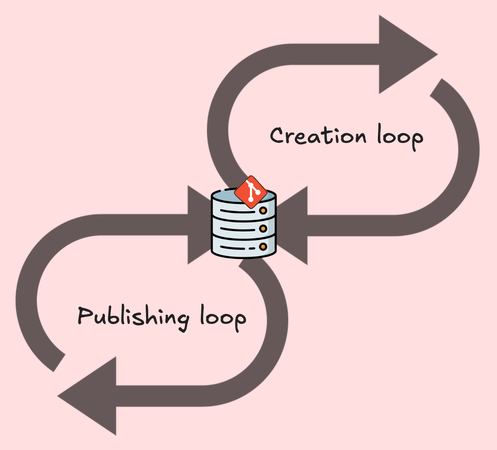
With the two loops it's almost like a bike. The frame as linking pin between the two wheels. Me pedaling and moving forward to the next post.
Most of the self-imposed principles have been followed. Everything is running and the workflow works as intended. Is there room for improvement? Probably.
Food for thought
While writing it occured to me that the www-user on my VPS only needs read-rights on the repository. Taking it one step further, the whole repository could be made "public" instead of being "private". With the content publicly available, the VPS is only the medium to turn it into a publicly available website.
A possible side-effect of the publicly available content is that AI-crawlers can just read the pure markdown. No need to scrape the webpages, easier to process. This came as an insight after I heard that most website traffic is generated by crawlers and scrapers.
Maybe we should offer the raw markdown content as new type of RSS-feed so it can be fed directly into an AI. The webserver offering the website as HTML and the raw markdown based "AI-content-feed".